
How Can I Check My Car VIN Number Online?
Checking a car's VIN number online is two jobs: finding the code on the car, then running it through a history search. The VIN is the identity code given to the vehicle when it is made. Once you have copied it down, an online search can tell you whether records have been reported against that car. This guide covers where to find the number, how to run the search and read the result, which mistakes waste time or money, and when to ask a professional instead.
Quick answer: Find the VIN on the car, usually on the dashboard by the windshield or inside the driver's door, then enter it into an online vehicle history search. A free search shows how many records have been reported against that code.
What a VIN is and why it makes an online history check possible
Every car built after 1980 [1] carries a unique vehicle identification number or VIN [1]. It works like the car's fingerprint. The code is assigned when the vehicle is made and is meant to stay with it through every owner, repair and registration. That permanence is what makes an online check possible. When something about a car is recorded, the entry is filed against that code, so a VIN search can gather entries that would otherwise sit in separate places.
A licence plate is different. A plate can be moved to another vehicle, reissued after the owner moves, or swapped for a personalised one. A plate search can therefore lead you to the wrong history. The VIN does not have that problem, which is why history services ask for it rather than the plate.
For a history search, the only thing that matters is having the complete code, character for character. You do not need to know what any part of it means. A search with one character wrong is a search for a different car, or for no car at all, so accuracy when you copy it down is worth more than any background knowledge.
If your car was made before the cut-off above, its identification code may not follow the same format, and the online searches described here may not recognise it. For an older car, ask a classic-car club, a specialist dealer or your vehicle registration authority.
Where to find the VIN number on your car
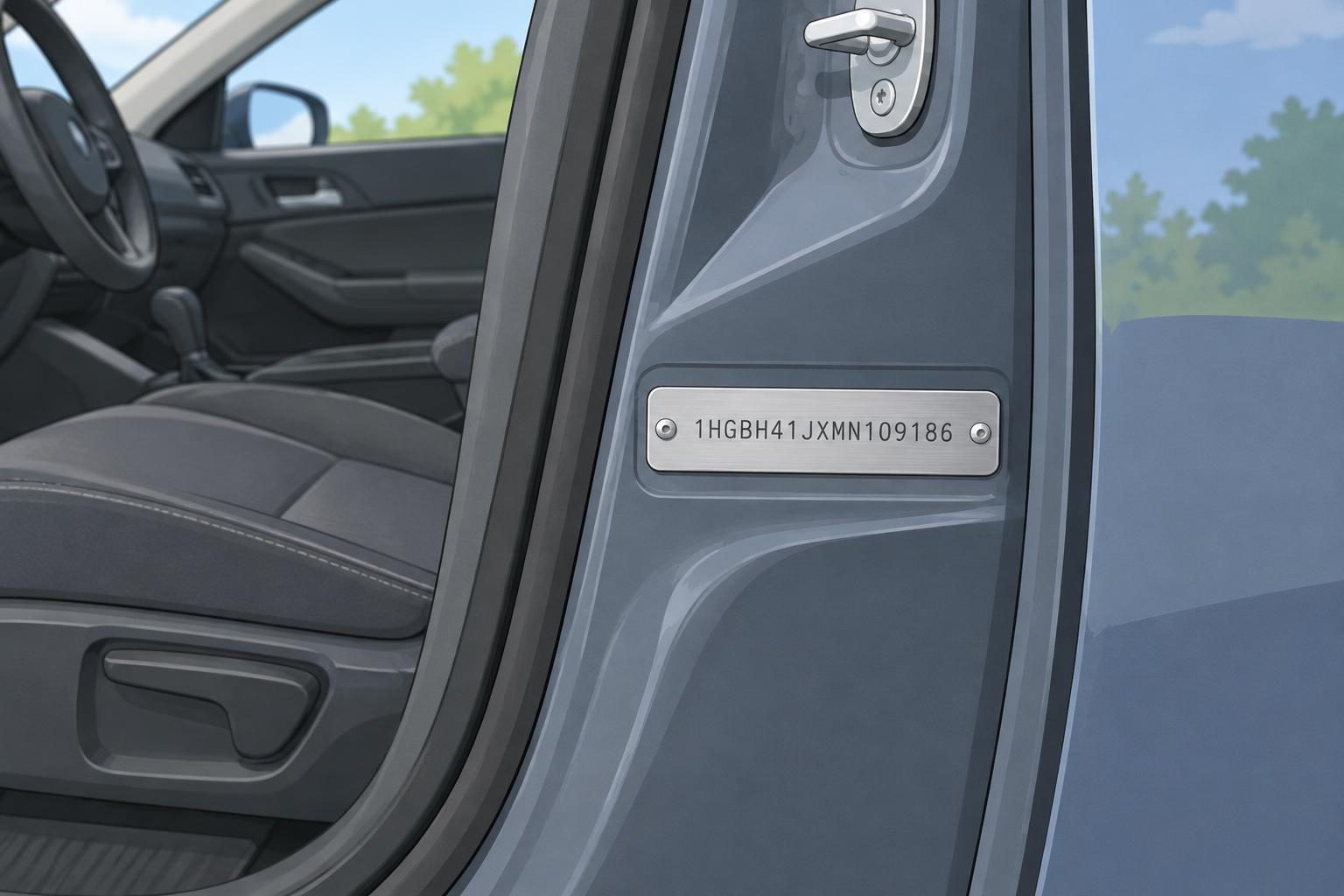
You do not need tools or dealer paperwork to find the code. The reference lists three places to look:
- On the driver’s side dashboard near the windshield [1]
- Inside the driver’s side door near the latch [1]
- On the owner’s insurance card [1]
The dashboard location is the one you can reach without unlocking the car. Stand outside on the driver's side and look through the lower corner of the windshield, where the dashboard meets the glass. The code sits on a small plate there, so you can read it from outside. This is useful when you are looking at a parked car that is for sale.
The door location means opening the driver's door and looking at the edge of the door or the frame around the latch. A sticker or plate there usually shows the VIN next to other manufacturer details. You will need the keys, or the owner standing beside you.
The insurance card helps when the car is not in front of you. That might be when you are filling in a form at home, or when the car is at a garage across town.
| Where to look | Do you need access to the car? | Handy when |
|---|---|---|
| Driver’s side dashboard near the windshield | Only to stand beside it | Viewing a parked car, including one for sale |
| Inside the driver’s side door near the latch | Yes, the door must be open | You have the keys or the owner is present |
| Owner’s insurance card | No | The car is elsewhere and the policy papers are to hand |
Tip: If you own the car and want to run the search from home, look on the owner’s insurance card [1] before you go out to the driveway. If the code is printed there, you can do the whole check at your desk and only walk out to the car if the card is missing or hard to read.
How to run the check online, step by step
Once you have the code, the search takes a few minutes. Working in this order saves you from going back and forth:
- Write the full VIN in a note on your phone or on paper, copied from wherever you found it.
- Go to the AutoCheck site, which offers the AutoCheck Vehicle History Report [1].
- Start with the free option: use this FREE vehicle search that gives you the number of records as reported in the full AutoCheck Vehicle History Report [1].
- Type the code into the search box and submit it.
- Note the record count and save a screenshot of the result page with the code visible.
- Decide whether to go on to the full report [1], based on how serious you are about the car.
The free count is worth running first. It tells you whether there is any history to read before you commit to anything more.
This approach also works well when you are shopping around. Say you have found three similar hatchbacks in listings and read the VIN on each one at the viewings. Run all three through the free search in the same sitting, and you can see side by side how much has been reported for each car. You can then spend your time, and any money, on the full report [1] for the one or two you would actually buy.
Keep your notes together: the code, the listing, the screenshot of the count and anything the seller told you. If you go back to the seller with questions, having the exact code and result in front of you keeps the conversation specific. It also helps if you hand the purchase over to someone else, such as a family member or an adviser, because they can pick up where you left off without starting the search from scratch.
If you own the car and are checking it for your own records, the same steps apply. Owners sometimes run the search before selling, so they know what a buyer will see and can have receipts or explanations ready for any entries.
Reading the result of a free VIN search
The free search gives you a count, not a story. It tells you how many records are reported against the code in the full report, but not what those records say. Treat it as a filter that helps you decide what to read next, not as a final answer about the car.
The difference between the two options is the level of detail. The free search gives you a number. For a full vehicle history (with information about those records) you’ll want to run a full AutoCheck Vehicle History Report [1]. That second step is where you learn what each entry is about, rather than only how many there are.
A higher count is not automatically bad news. A car that has had several owners, moved between regions or been serviced regularly can collect many entries over the years. A low count does not prove the car has had a quiet life either. It only means fewer events were reported against that code. The detail that matters is inside the full report, not in the number on its own.
Use the count to plan your next move:
- If you are serious about the car, the full report [1] is where the detail is, so that is the next thing to read.
- If you are comparing several cars, the counts show at a glance which histories have more to read, so you can plan your time.
- If the search returns nothing, do not treat that as a clean bill of health. Ask a dealer or your registration authority before you rely on it.
- If you cannot make sense of the full report, take it to a dealer or other professional you trust and ask them to walk you through it.
Write down the count next to the code in your notes. If you run the search again later, for example just before you hand over a deposit, you can see straight away whether anything new has been reported since your first look.
Mistakes that cost time or money
Most failed or misleading checks come down to a few avoidable errors:
- Typing the licence plate into the VIN box. They are different codes, and the history search needs the VIN.
- Misreading characters that look alike. Faded plates and worn stickers can make some letters and digits hard to tell apart, so a code read in poor light is a common source of a failed search.
- Dropping a character when copying from a phone screen, so the search points at the wrong car or at nothing at all.
- Expecting a history search to tell you the trim. A record count says nothing about equipment level. For that, see what trim is my car by VIN.
- Treating history as a price guide. History can affect what a car is worth, but a count is not a valuation. Our guide on how to find a vehicle's market value covers that side.
Warning: Do not rely only on a code that a seller types into a listing or sends in a message. If that code belongs to a different car, any report you pay for describes the wrong vehicle, and you could make an offer based on someone else's history. Read the code yourself from the car, on the driver’s side dashboard near the windshield [1], before you spend money on a full report.
The last common mistake is stopping too early. A free count with nothing alarming in it can make a buyer relax and skip the next step. That is your call, but go in knowing that the count has not told you what happened to the car, only how much was reported.
When you only know the car by sight
Sometimes you spot a car you like in a car park or on the street, or you are looking at an advert photo that does not show the VIN. A history search cannot run on a picture or a description. It needs the code itself. Unless you can stand next to the car or the owner gives you the code, you cannot run the online check yet.
In the meantime, keep whatever the advert or the owner tells you about the car: the make, the model and the year they give, plus the listing link and any photos. That is enough to start reading about the model in general and to prepare questions for the seller, even though none of it is a substitute for the history search.
Two cars with the same badge can differ a lot in equipment, so the trim matters too. Our guide on how to find the trim level of a car covers that, and how to decode car trim level codes helps if the paperwork uses abbreviations.
When the car moves from interest to a possible purchase, ask the seller for the VIN. Then read it on the car yourself, for example inside the driver’s side door near the latch [1], before you run the history search. That way, the details you saved from the advert, the code on the car and the history report all describe the same vehicle.
When to ask an expert instead of relying on a search
An online check is a desk exercise. Some situations need a person who can look at the car or its paperwork in detail:
- You cannot find the code in the usual places, or the car is older than the cut-off where the standard code applies.
- The report shows entries you do not understand, and the seller cannot or will not explain them.
- The paperwork you are shown does not seem to belong to the car in front of you.
- Anything about the car's identity makes you uneasy, even if you cannot say exactly why.
In these cases, a trusted independent mechanic, a franchised dealer for that make, or your vehicle registration authority can help. If you suspect the car's identity has been tampered with, walk away from the deal and report it to the police rather than confronting the seller.
History is only one part of the picture. A record search says what has been reported against a code. It does not tell you how the car runs today or whether the asking price is fair. Questions about the car's present state are for a professional you trust, in person, and the market value guide linked above helps with price. Put those together with the history result, and you are making a decision on more than one search.
Putting a name to a car you have spotted
A history search answers one question: what has been reported against this code. It does not tell you what a car is when you see it across the street. Car Identifier is an app built for that gap: from a new photo or one already in your photo library, it reports the make, model, year and specifications, working from features such as body style and grille design.
Results can be saved to a personal garage, which keeps cars you are considering in one place, and shared with friends. When one of those saved cars becomes a real prospect, get the VIN from the car or the owner and run the online history search described above.
Common questions
- Is a free online VIN check enough before buying a used car?
- It is a useful first filter because it shows whether there is history to read, but it does not describe what happened to the car. If you are close to buying, ask a dealer or other professional you trust to go through the full history with you.
- Can I run a VIN search on a car I do not own?
- The search works on the code, not on who owns the car, so you can enter a VIN a seller gives you. Make sure you read the same code on the car itself before you rely on any result.
- What does it mean if the search finds no records?
- It means nothing was reported against the code that was entered. One wrong character points the search at a different vehicle or at nothing, and an empty result is not proof of a clean past, so ask a dealer or your registration authority if it surprises you.
- Is the VIN the same as my licence plate number?
- No, the plate is issued for registration and can change, while the VIN is assigned when the car is built and is meant to stay with it. That is why history searches ask for the VIN.
- Will a VIN history check tell me what my car is worth?
- Not on its own. History can affect value, but price also depends on mileage, condition, trim and local demand, so treat valuation as a separate task.